
Perth Gaming VPN
Less lag. Play to win.
You bring the aim, timing and teamwork. We focus on a better route from your gaming PC to your game servers — designed to lower latency, reduce jitter and minimise packet loss, so you can focus on your next win.
Put it to the test with a 7 day free trial. Compare your connection in the games you actually play.
Optimized for the games you grind
From Counter-Strike 2, VALORANT and Apex Legends to World of Warcraft and Final Fantasy XIV, Perth Gaming VPN focuses on the connection between your PC and your game server. Try your favourites during your 7 day free trial.






















Better routing. Better gaming.
Your connection should keep up with your game. We focus on latency, jitter and packet loss, with an encrypted WireGuard tunnel to our Perth server.
Lower Ping
A more direct route to your game server can reduce round-trip delay, helping your inputs reach the server sooner.
Less Jitter
More consistent packet timing can smooth out ping spikes and reduce the rubber-banding that interrupts your match.
Reduced Packet Loss
Routing around a congested or unreliable path can help more game updates arrive, reducing stutters and missed updates.
Real VPN Security
WireGuard® encrypts traffic between your device and our Perth VPN server. Game servers see the VPN's public IP for traffic sent through the tunnel.
Built for Your Gaming PC
Connect directly on your Windows gaming PC with a lightweight WireGuard client. Follow the 3-step PC guide. Clients are also available for macOS, Linux, Android and iOS.
Fast, Simple Setup
No bloated client, no config headaches. Import one file, hit activate, and you're routing smarter in moments.
How it works
We run a VPN server physically hosted in a Perth data centre. You install a WireGuard client on your device and connect — that opens a fast, encrypted tunnel straight to our server.
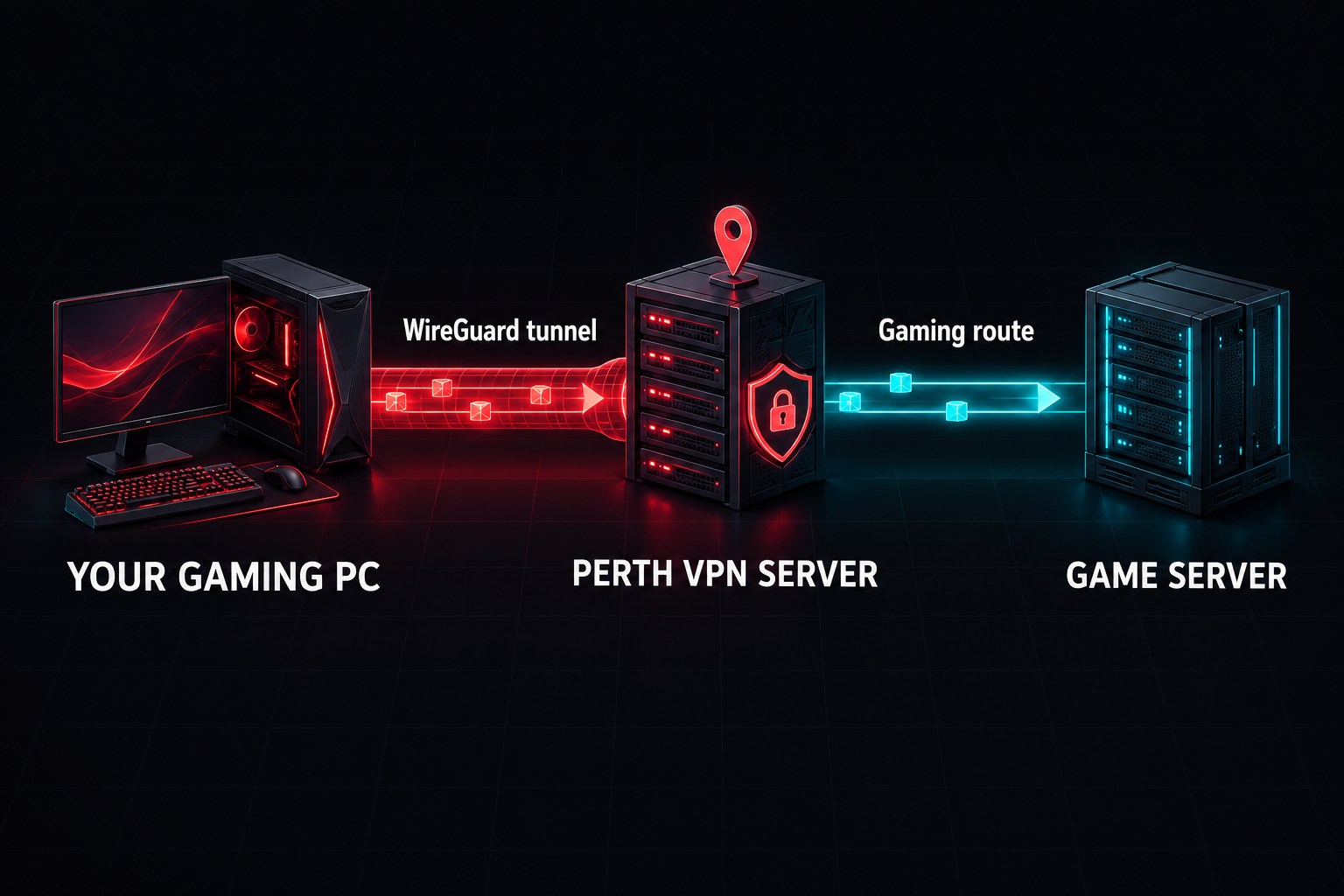
Your ISP still carries your connection to our Perth server. From there, your game traffic uses our gaming-focused network to reach its destination. When that onward route is better than your ISP's usual route, it can improve latency, jitter and packet loss.
Results depend on your ISP, home connection and game server location. Use the 7 day free trial to compare the same game and server with and without the VPN. A VPN cannot fix weak Wi-Fi, a faulty connection at home or the distance to a faraway server.
Less lag. More consistency.
A better gaming experience starts with three connection metrics. Here's what they mean and how better routing can help. Our Perth gaming lag guide helps you check high ping, jitter and packet loss on your PC.
Latency
aka PingLatency, or ping, is the time a packet takes to travel to your game server and back, measured in milliseconds. Lower ping means less delay between your actions and the server's response. A better route from Perth can shorten that journey.
Jitter
VarianceJitter is the variation in latency from one packet to the next. Even a low average ping can feel laggy when it keeps spiking. A more consistent route can reduce sudden delays, making movement and gameplay feel smoother.
Packet Loss
Worst OffenderPacket loss happens when some data never reaches its destination. Missing game updates can cause stutters, rubber-banding and delayed actions. An alternative route can reduce loss caused by congestion or faults along your ISP's usual path.
Connect in 3 steps
Set up once, then activate your saved tunnel before you launch your game.
Download your config
1. Install the official WireGuard client.
2. Log in to your Gaming VPN portal and download your gamingvpn.conf file.
Activate & play
1. Open the WireGuard client.
2. Choose ‘Import tunnel(s) from file’ and select your gamingvpn.conf.
3. Hit ‘Activate’ — you're routing smarter.
Want the walkthrough? Read the Gaming PC setup guide, including connection checks and help getting back to your game.
Available on


Try it free. Game from Perth.
Start with a 7 day free trial, then continue with monthly pricing. Test the difference on your own connection.
Perth Gaming VPN
- Gaming-focused routing from Perth
- Designed to reduce latency, jitter & loss
- WireGuard® encryption
- PC, mobile & console via PC sharing
- 7 days to test your favourite games
- Cancel anytime
Perth Gaming VPN questions, answered.
Can a gaming VPN reduce ping in Perth?
It can when the VPN's route to your game server is better than your ISP's usual route. Perth Gaming VPN is designed to reduce latency, jitter and packet loss, but the result depends on your connection and game server. Use the 7 day free trial to compare your own games with and without the VPN.
Why connect to a VPN server in Perth?
Our VPN server is physically hosted in a Perth data centre. Your PC connects to that local server before traffic takes our onward route to your game server. That gives Perth gamers an alternative to their ISP's usual routing. See how the connection works.
How do I set up the VPN on a gaming PC?
Create your account, install the official WireGuard client and download your configuration, then import the file and activate the tunnel. Our Windows gaming PC setup guide walks through the three steps and includes connection checks.
Which games should I test during the free trial?
Test the online games you play most, such as Counter-Strike 2, VALORANT, Apex Legends, League of Legends or World of Warcraft. Keep the same server region for your comparisons and watch ping spikes and packet loss as well as average ping. Results can differ between games and regions.
Will it fix Wi-Fi lag or low FPS?
The VPN changes your network route. Weak Wi-Fi, local congestion and PC performance need their own checks. Try Ethernet, pause background downloads and look at your game's frame rate and network statistics. Start with our gaming lag troubleshooting checks.
Can I use Perth Gaming VPN on Xbox or PlayStation?
Yes, by sharing a Windows PC's WireGuard connection over Ethernet. The PC must stay on and connected while you play, and console setup needs extra sharing steps. Follow the Xbox and PlayStation VPN setup guide.
Do I need a credit card for the 7 day free trial?
No credit card is required to start the trial. You have 7 days to test the service in your games before deciding whether to continue with a paid plan. See current monthly pricing or start your free trial.
Your games. Your connection.
7 days to feel the difference.
Try Perth Gaming VPN and compare your latency, jitter and packet loss in the games you play most.
Start 7 day free trial